Many agents. Many models. One brain.
It starts as your agent's memory: a private, local store that remembers your project's decisions and feeds them back, so you stop re-explaining yourself every session. The same memory then lets a team of agents work together: different model families checking each other's work over shared context instead of a group chat. Claude Code, Codex, opencode and Vibe today; Hermes in alpha. Two commands. Free forever, on your machine.
The orchestration layer for coding agents.
One coordinator drives many agents, across many model families, over a shared brain. The orchestration is what you reach for; the shared memory layer is what makes it possible.
Multi-agent orchestration
stableA single-writer coordinator drives a fleet through a typed blackboard. Design, Develop, Studio and Image modes; the agent that checks a piece of work never wrote it.
implement ↔ review ↔ judge How it works →Multi-model, cross-runtime
stableOne memory across Claude Code, Codex, opencode and Mistral Vibe, with Copilot, Muse and Hermes in alpha. Each runtime keeps its own model bill; Hydrate is the layer they share.
Claude · Codex · opencode · Vibe · Muse alpha See the runtimes →Advanced shared memory
stableYour project's memory, on your machine, private by default. Provenance and trust-weighted recall (on by default) float well-sourced decisions above one-off noise. Sharing is opt-in.
local-first · trust × freshness × relevance Inside the memory →Peernet
newSessions on different machines ask each other for live state over your own network; no relay in the path. v1 answers with daemon-owned metadata only.
hydrate_ask_peer(…) How Peernet works →Token economics
measuredRemembered context replaces re-pasted context. On a measured 26-hour sprint, every $1 of injection avoided about $18.50 of re-paste. The dashboard reports measured savings, not estimates.
$1 in ≈ $18.50 not re-pasted See the economics →Three jobs you can hand the fleet.
You stay in the session you already have open. The local daemon spawns the workers, and the agent that checks a piece of work is never the one that produced it: Codex reviews what Claude wrote, a vision model judges what the generator drew. Every worker reads the same shared memory, and every verdict is recorded.
- Design mode proven
Pressure-test a design before you build it.
Point it at a spec or an RFC. A Codex critic files objections; you rule on each one; the author revises; the next round checks the fixes held. Capped at eight rounds, then it converges or escalates to you. We used it on Develop mode's own spec: eight rounds, fourteen objections, then sign-off.
How Design mode works → - Develop mode live
Parallel implementation with a second opinion built in.
You define the work units. Claude implementers run them in parallel, each in its own git worktree. Codex reviews every patch and a judge scores it against a five-point rubric; anything that fails goes round again, up to a cap, then comes back to you. Verified work merges to an integration branch. It never touches main; that merge is yours.
How Develop mode works → - Image mode new
Generate images with a critic in the loop.
You write the spec, a Codex generator renders it, and a separate vision model marks the result against the spec. In our first smoke test the judge rejected a gradient-shaded circle because the spec said flat vector, and the pipeline redrew it. That strictness is the point: a bad image is caught before you see it.
How Image mode works →
Most multi-agent tools put agents in a chat room. They lose track of who did what, and no agent can trust work it did not watch happen. Hydrate's workers never talk to each other at all: they read and write one shared memory under a single coordinator, which is how a Claude implementer and a Codex reviewer hold the same context on the same task.
A process you can trust. Not a group chat.
The daemon owns all state, spawns the workers, enforces the rules and drives the fleet to convergence. Parallelism is bounded by a spawn cap, and workers are hydrated with their project's memory but walled off from every other target's context.
- Typed artifacts, not chat — workers never message each other. They communicate through plans, patches, reviews and verdicts, and through git.
- Cross-family review — Claude implements; Codex reviews and judges, with Fable standing in when Codex is unavailable. Each catches the other's blind spots.
- Human gates throughout — you rule on objections, you open the integration gate, and the merge to main is always yours.
design_start    draft: docs/specs/develop-mode.md
design_round    Codex critic files 5 structured objections
design_resolve  you rule: 4 accepted, 1 contested
design_round    revisions hold; 0 material objections remain
design_signoff  finalised design + full decision log
Develop mode's own spec was converged this way: 8 rounds, 14 objections, human sign-off.
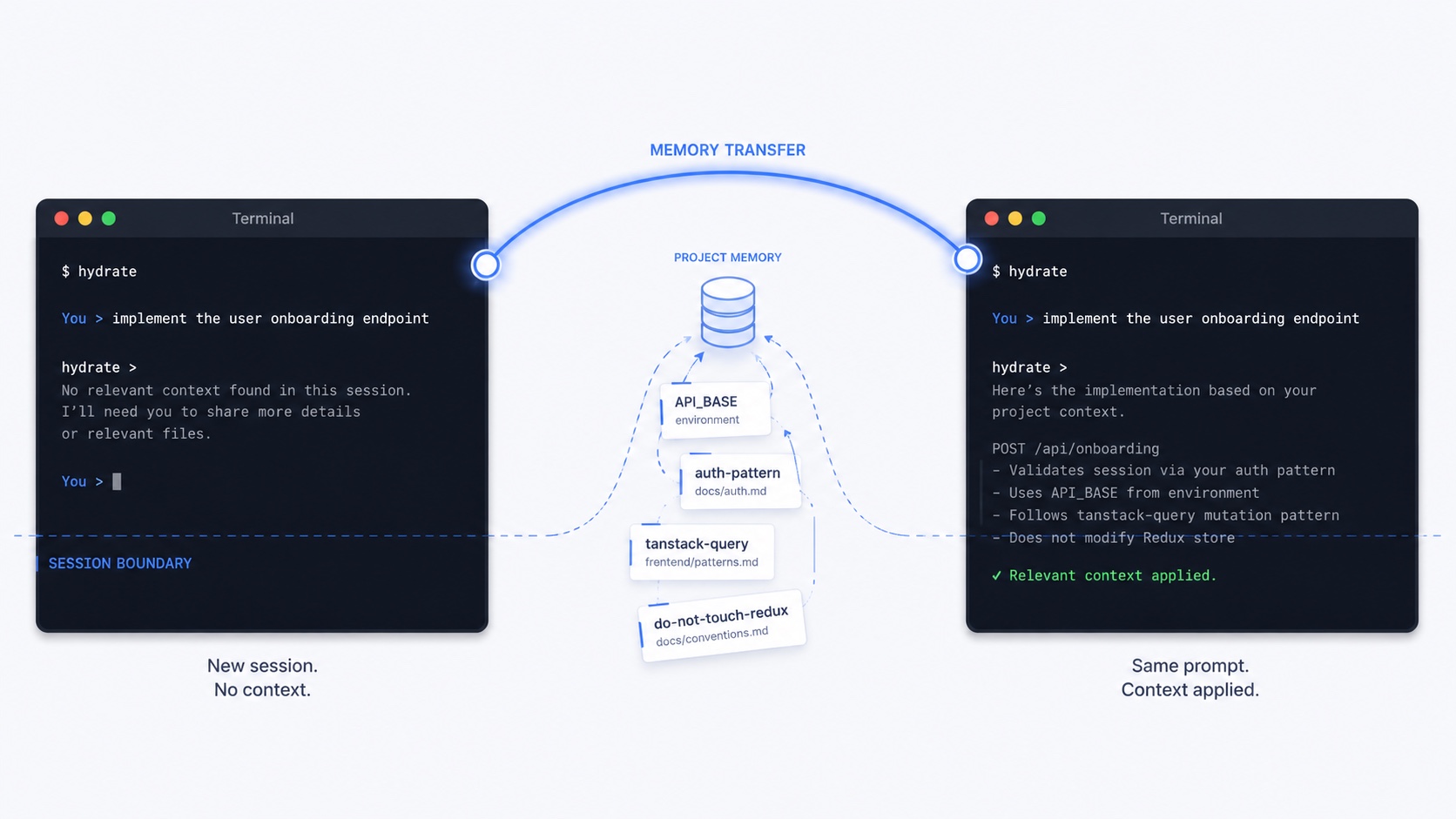
The same prompt, twice. Once cold, once hydrated.
Left: a fresh Claude Code session, no project context. Generic answer. Right: same prompt after Hydrate injects four facts it learned in your previous session (API_BASE, the auth pattern, the data-fetching library, the "do not touch redux" rule). It all lives in a local store on your own machine: no account, no API key, nothing sent to a cloud we run. You can read, edit and delete any of it, and it is free forever for solo work.
on by default Recall now ranks by trust × freshness × relevance, not raw similarity, so well-sourced, repeatedly-confirmed facts surface above one-off noise. Provenance-weighted recall is the first memory-evolution default to flip on.
opt-in preview Capture-time claim management, a synthesised user model and skills memory are shipping behind flags, default-off, while the cross-runtime benchmark calibrates. Safe to try; not yet a promise. Inside the memory layer →
See it in action.
Two unedited screen recordings. First you add Hydrate. Then you
watch a real Claude Code session survive a /clear
with its working context intact. No scripting, no cuts.
Add Hydrate
You have Claude Code. You have a project. Two commands and a
local memory layer is wired in: brew install,
hydrate setup, hydrate init.
Watch it work
A live session adds a --word-count flag to
glow. The dashboard on the right fills with
activity as Hydrate captures the work. Then
/hydrate-distill → /clear
→ /hydrate-last: the fresh session picks
up exactly where the last one left off.
Equal quality, fewer tokens.
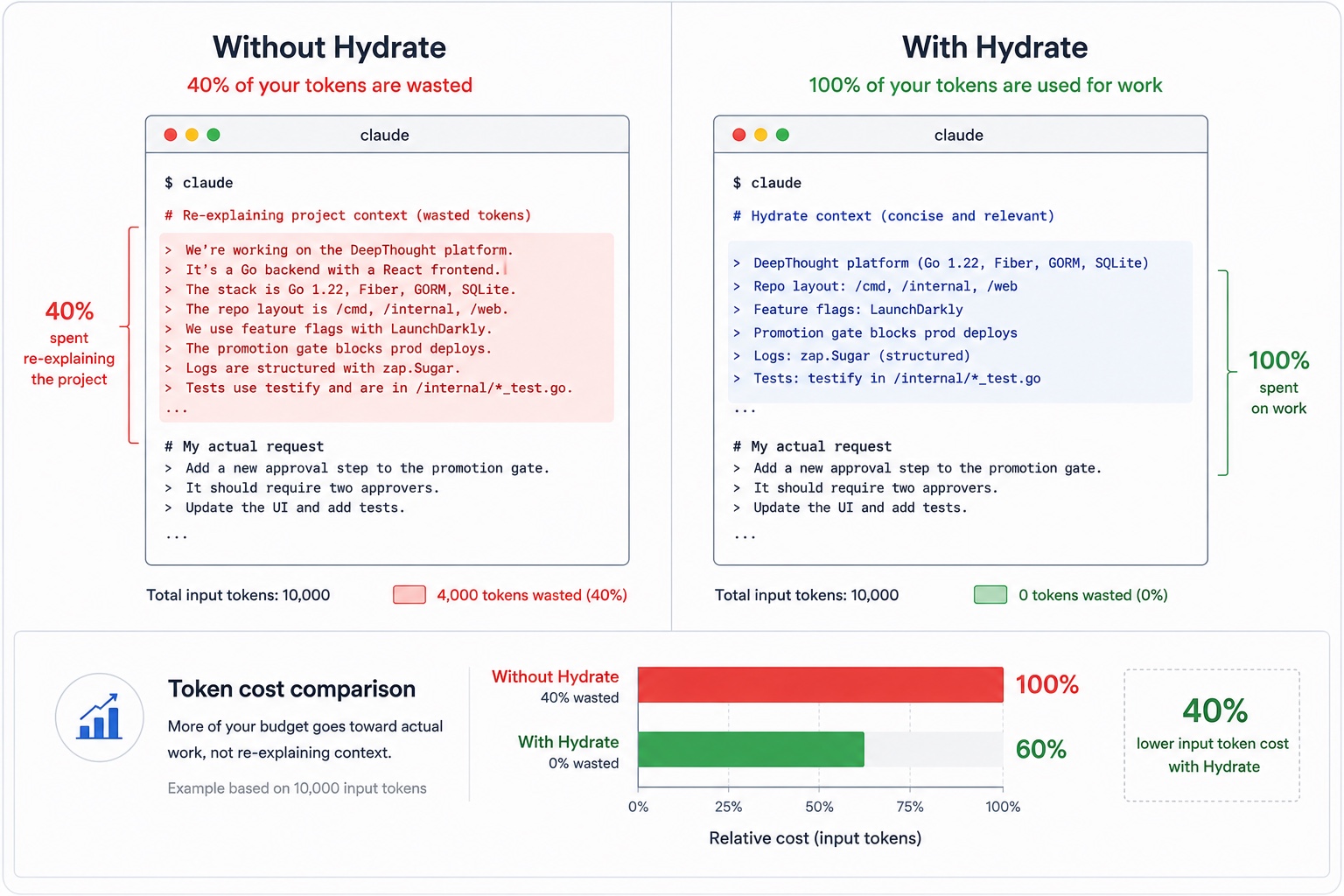
We ran the same code-generation task with and without Hydrate, on claude-sonnet-4-6. With its canon loaded, Hydrate built the same thing for about 11% fewer output tokens. The quality scores are statistically identical, 12.1 against 12.5, so this is not a quality play. The model simply spends fewer tokens reaching the same result, because the canon hands it the spec instead of making it rediscover your conventions every session.
| Per task | Without Hydrate | With Hydrate | Difference |
|---|---|---|---|
| Output tokens | 118,347 | 105,261 | −11.1% |
| Cost | $4.341 | $4.065 | −6.3% |
| Turns | 107.8 | 104.1 | −3.4% |
| Quality (grader, out of 20) | 12.50 | 12.10 | matched |
lquery benchmark · n=10 · claude-sonnet-4-6 · the baseline runs with no memory, Hydrate runs with project canon. Quality parity is the guardrail: a token saving only counts if the build is just as good.
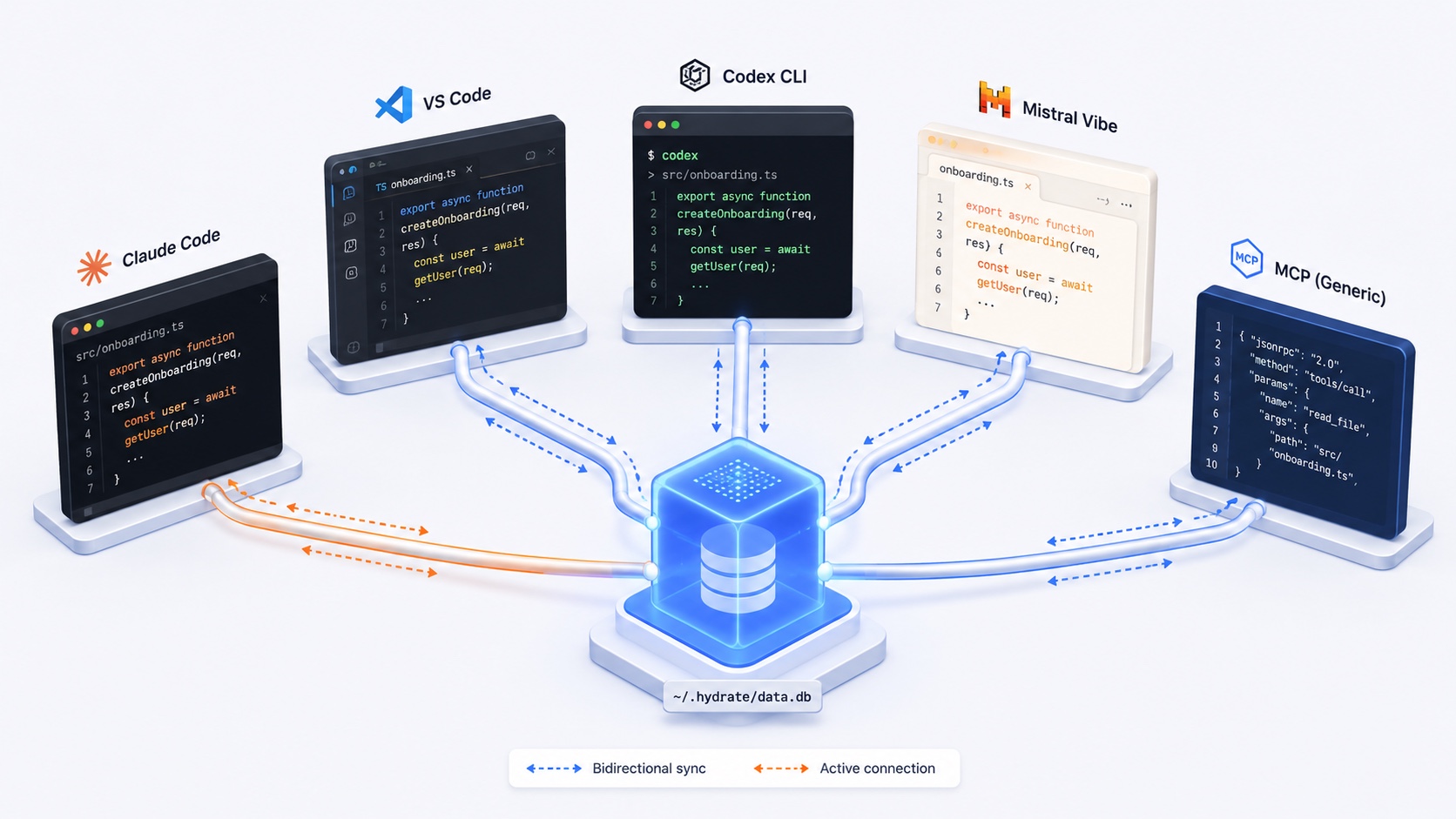
One brain. Every runtime keeps its own model bill.
The same memory across Claude Code, Codex, Mistral Vibe and MCP clients, with Hermes in alpha. Each runtime authenticates and pays for its own model; Hydrate is the layer they share. A decision captured in one is there for the next session in another: injected automatically in Claude Code and Codex, and available on demand over MCP everywhere else. That is exactly what lets an Author in one model family and a Critic in another work over shared state.
Claude Code
shipping
Native hooks - UserPromptSubmit, Stop,
PreToolUse, PostToolUse. Zero
configuration. Works on day one with your existing Claude
subscription.
VS Code + Copilot
v1 launch
VS Code extension with @hydrate chat participant
plus three Language Model Tools Copilot auto-invokes.
One memory shared with Claude Code, fewer tokens per turn.
Codex CLI + app
shippingOpenAI's Codex CLI and macOS app share the same local memory store as Claude Code. Pin a fact in a Claude session, open a fresh Codex session on the same workspace, and it recalls the fact unprompted, which is what makes a Codex Critic possible.
See the Codex page →Hermes
alphaNous Research's Hermes via an exclusive memory-provider plugin slot (early access). Reads shared identity into the system prompt and reads/writes project recall against the local daemon. Profile write-back and gateway binding are still in testing.
See the alpha →Mistral Vibe
shipping
MCP server wired into Vibe via hydrate vibe install.
Receives Claude Code and Copilot project memory on the first tool
call. Contributes facts back to the shared store.
MCP server
shippingWorks with every MCP-aware client - Claude Desktop, Cursor, Cline, Zed, Gemini CLI, your own agent. One endpoint, the same memory, the same savings.
Integration guide →hydrate peer pair 027-674 # found window on mini
✓ paired · scope mini/hydrate
hydrate_ask_peer("mini/hydrate", "what now?")
{ status: ok, project: hydrate, git_sha: e035139, … }Verified live: a laptop and a Mac mini, direct over the tailnet, about 12 ms.
Ask your other machine what it is working on.
Peernet is opt-in peer messaging between activated sessions on different machines, over your own LAN, VPN or tailnet. No third-party relay, no cloud round-trip: your own daemons talk directly. And the answerer is the daemon, not a live session with shell access. It returns metadata only, the active project, the git SHA, a session summary, with zero filesystem access and zero mutation on the machine that answers.
- Pair with one code — a six-digit code, single use, two-minute expiry, three attempts. No IP addresses, no config blobs.
- A daemon answers, not a shell — the main daemon is never exposed; peer traffic gets its own dedicated listener and a per-peer revocable credential.
- Leased and audited — presence heartbeats every 30 seconds and expires on its own; every ask is minted a thread id on the record.
Hydrate already speaks Google's new knowledge format.
OKF is a tiny, file-based standard for portable knowledge: markdown plus YAML frontmatter plus a graph of links. That is the shape Hydrate has written from day one. Its wiki, memory, handovers and packs are one field away from conformance. This is not adopt a new format. It is declare the format you already speak, and your richer metadata rides along as extension fields a generic consumer simply ignores.
- One field from conformance: OKF requires only a non-empty
type, and everything else is already there. - Lossless and near zero cost: trust, decay, scope and provenance ride along as preserved extension fields.
- A knowledge graph for free: a conformant wiki gives the dashboard a navigable graph view, almost for nothing.
type: Source File          # the one required field
title: cmd/hydrate-server/peer.go
description: Peer listener and endpoints.
tags: [peernet, server]
hydrate-wiki:              # preserved as an extension
  id: 1a6e83cf-…
Five top-level keys plus the block you already write. That is a conformant OKF bundle.
Start free. Lock $5/mo Pro for your first 12 months.
Register during beta (whichever edition you pick) and your Pro rate is locked at $5/mo for your first 12 months; $9/mo retail thereafter. How this works →
Free
Up to 2 active projects, full hooks + dashboard. No account. Registering during beta also locks the $5/mo Pro rate for your first 12 months.
Install + lock ratePro
$9/mo retail thereafter · free during beta + 30 days after v1 launch
Unlimited active projects plus per-project backup / restore. Lock $5/mo for your first 12 months of Pro; $9/mo retail after.
See Pro details →Team
Shared project memory across teammates. Indicative launch rate; Team is not part of the beta lock.
Contact sales →Enterprise
Self-host or managed. SSO, org-scoped policy facts, audit logs, air-gap support. Online and offline, data synced via git.
Learn more →